> ## Documentation Index
> Fetch the complete documentation index at: https://docs.inboxapp.com/llms.txt
> Use this file to discover all available pages before exploring further.
# Import leads from X
> Import followers, following, X list members or followers, and post engagement into a lead list.
Available on Pro. See [Plans](/get-started/plans).
Every import starts the same way:
1. Open a lead list, or [create one](/help/sales/lead-lists).
2. Click **Add Leads**.
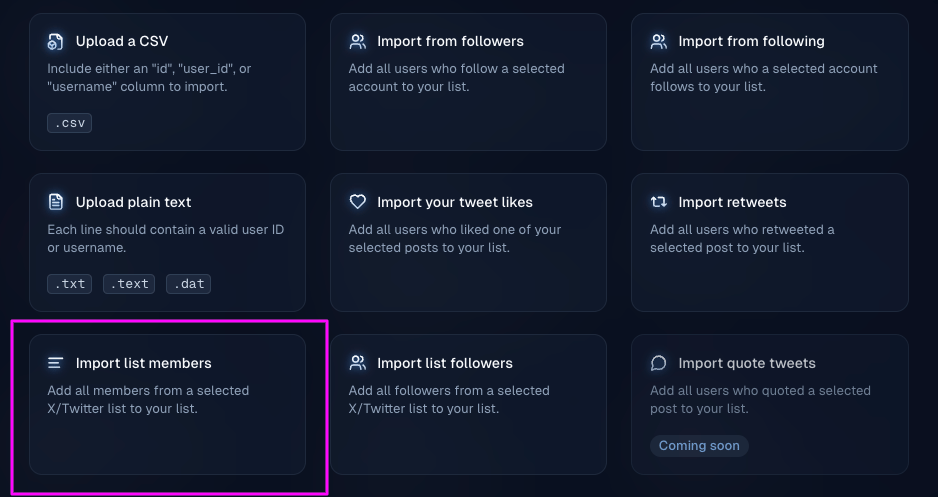
3. Pick a source below, fill in its details, and start the import.
Imports run in the background. Credits apply on earlier Pro plans — see [Plans and credits](/help/billing/billing-plans-and-credits).
## Followers
Imports recent followers of a public X account.
Choose **Import from Followers**, enter the X handle (for example `@inboxapp_`), then click **Start Import**.
## Following
Imports the accounts a public X profile follows.
Choose **Import from Following**, enter the X handle, then click **Start Import**.
## X list
Imports the **members** or the **followers** of an X list.
Choose the X list import option, pick **list members** or **list followers**, enter the list details, and start the import.
 ## Post engagement
Imports people who interacted with a post on X. Choose the interaction:
* **Likes** — typically your own posts
* **Retweets**
* **Replies**
* **Quote tweets**
Paste the post URL (or select the post when prompted), then start the import.
Unreachable or invalid profiles are filtered and not charged — [Reachable leads and the Contacted list](/help/sales/reachable-leads).
## Related
* [Import leads from a CSV](/help/leads-management/importing/importing-leads-to-inboxapp-from-a-csv-file)
* [Troubleshooting lead imports](/help/leads-management/importing/troubleshooting-lead-imports-csv-followers-quick-guide)
* [Lead lists, tags, and filters](/help/sales/lead-lists)
Still stuck? Contact support from the app.
This documentation is built and hosted on [Mintlify](https://mintlify.com), a developer documentation platform.
## Post engagement
Imports people who interacted with a post on X. Choose the interaction:
* **Likes** — typically your own posts
* **Retweets**
* **Replies**
* **Quote tweets**
Paste the post URL (or select the post when prompted), then start the import.
Unreachable or invalid profiles are filtered and not charged — [Reachable leads and the Contacted list](/help/sales/reachable-leads).
## Related
* [Import leads from a CSV](/help/leads-management/importing/importing-leads-to-inboxapp-from-a-csv-file)
* [Troubleshooting lead imports](/help/leads-management/importing/troubleshooting-lead-imports-csv-followers-quick-guide)
* [Lead lists, tags, and filters](/help/sales/lead-lists)
Still stuck? Contact support from the app.
This documentation is built and hosted on [Mintlify](https://mintlify.com), a developer documentation platform.