> ## Documentation Index
> Fetch the complete documentation index at: https://docs.inboxapp.com/llms.txt
> Use this file to discover all available pages before exploring further.
# Prevent messaging leads you’ve already contacted
> Exclude the Contacted system list in campaign settings so prior outreach isn’t duplicated.
Requires **Pro**.
Exclude the **Contacted** system list on a campaign so prior outreach isn’t duplicated. What Contacted contains: [How the Contacted list prevents duplicates](/help/leads-management/concepts/how-the-contacted-list-protects-you-from-duplicate-messaging).
## Exclude Contacted
1. Create or edit a campaign.
2. Open **Campaign Settings**.
3. Under **Excluded Lists**, select **Contacted**.
4. Save.
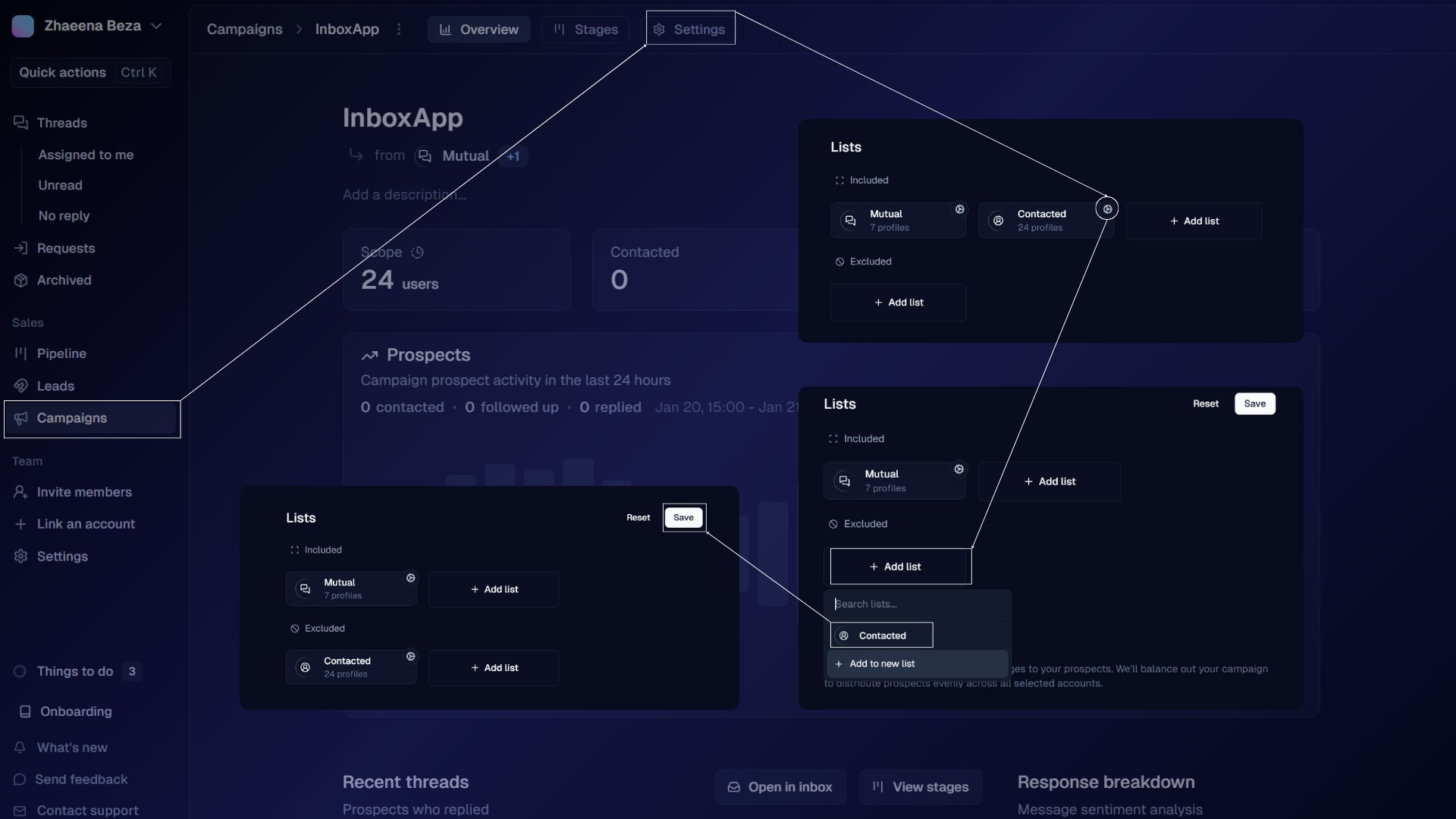 At launch, Inboxapp removes excluded lists first, then filters unreachable DMs — [Reachable vs unreachable](/help/leads-management/concepts/understanding-reachable-vs-unreachable-leads).
## Related
* [How the Contacted list prevents duplicates](/help/leads-management/concepts/how-the-contacted-list-protects-you-from-duplicate-messaging)
* [Campaign not sending](/help/campaigns/fix/why-is-my-campaign-not-sending-messages)
* [Reachable vs unreachable leads](/help/leads-management/concepts/understanding-reachable-vs-unreachable-leads)
Still stuck? Contact support from the app.
At launch, Inboxapp removes excluded lists first, then filters unreachable DMs — [Reachable vs unreachable](/help/leads-management/concepts/understanding-reachable-vs-unreachable-leads).
## Related
* [How the Contacted list prevents duplicates](/help/leads-management/concepts/how-the-contacted-list-protects-you-from-duplicate-messaging)
* [Campaign not sending](/help/campaigns/fix/why-is-my-campaign-not-sending-messages)
* [Reachable vs unreachable leads](/help/leads-management/concepts/understanding-reachable-vs-unreachable-leads)
Still stuck? Contact support from the app.