> ## Documentation Index
> Fetch the complete documentation index at: https://docs.inboxapp.com/llms.txt
> Use this file to discover all available pages before exploring further.
# Design multi-step DM sequences
> Build a campaign with follow-up steps and delays between messages.
Use multi-step sequences to send a first DM, then follow-ups after a delay if the lead hasn’t replied.
1. Confirm your X account is linked.
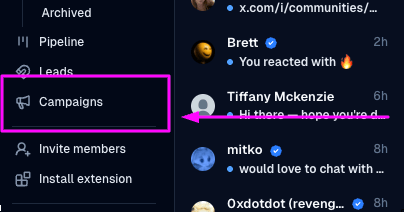
 2. Open **Campaigns** → **New Campaign**.
 3. Choose the recipient **lead list**.
4. Write the first message.
5. Click **Add Step**, set a delay (for example 1 day), and write each follow-up.
6. Add as many steps as you need.
7. Review timing and copy, then **Launch Campaign**.
3. Choose the recipient **lead list**.
4. Write the first message.
5. Click **Add Step**, set a delay (for example 1 day), and write each follow-up.
6. Add as many steps as you need.
7. Review timing and copy, then **Launch Campaign**.
 When someone replies, the sequence stops for that lead — [What happens when a lead replies](/help/campaigns/run-and-measure/what-happens-when-a-lead-replies-to-my-campaign).
## Related
* [Create your first campaign](/help/campaigns/build/create-your-first-campaign)
* [Personalize with variables](/help/campaigns/build/personalizing-dms-with-custom-variables)
* [Campaign stages](/help/campaigns/run-and-measure/understanding-campaign-stages-in-inboxapp)
Still stuck? Contact support from the app.
When someone replies, the sequence stops for that lead — [What happens when a lead replies](/help/campaigns/run-and-measure/what-happens-when-a-lead-replies-to-my-campaign).
## Related
* [Create your first campaign](/help/campaigns/build/create-your-first-campaign)
* [Personalize with variables](/help/campaigns/build/personalizing-dms-with-custom-variables)
* [Campaign stages](/help/campaigns/run-and-measure/understanding-campaign-stages-in-inboxapp)
Still stuck? Contact support from the app.